Hey everyone, it’s Jake from the large screen vape squad, and today we’re breaking down that thing a lot of you DM us about: how to actually tweak those settings on your big-screen vapes without feeling like you’re solving rocket science. If you’ve ever stared at that bright, colorful display (the one that’s way bigger than your old phone screen) and thought, “Wait, what do all these numbers even mean?” you’re not alone. When we first started engineering these bad boys, we made the screen oversize for a reason—so you didn’t have to squint at tiny buttons or scribbled cheat sheets—but turns out some of you still need a quick walkthrough. Let’s dive in, keep it real, no fancy jargon. Large Screen Vape
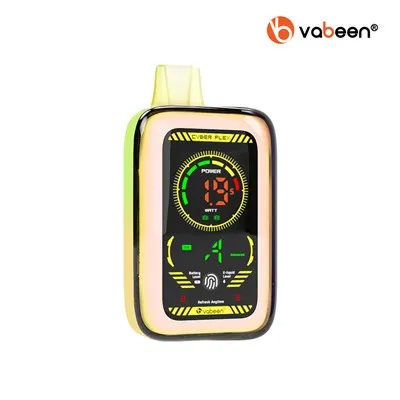
First off, let’s get one thing straight: large screen vapes aren’t like those tiny disposable pens you grab at the gas station. These are mod systems, right? They’re built for vapers who want consistency, control, and a display that lets you see exactly what’s going on with your setup. The “settings” we’re talking about aren’t just brightness—we’re covering mode selection, temperature control, puff time, and that screen brightness everyone complains about when they’re vaping on a sunny beach or in a pitch-black bedroom. All of these adjustments are made super straightforward on our models, so you don’t have to hunt through 10 menus to find what you need.
Let’s start with the basics: waking up the screen and getting into the settings menu. When your vape is off, just tap the fire button (the little button on the front) twice—we programmed that shortcut so you don’t have to hold it down for 3 seconds every time you want to check something. Once the display lights up, you’ll see a main screen with some core stats: battery percentage, current wattage/temp, puff counter, and that’s it. To get to the settings, just hold the fire button for 5 seconds, or tap the screen three times fast—yeah, that’s a touchscreen shortcut for you, no more fumbling with physical buttons while you’re trying to adjust on the fly. We added those touch shortcuts because we tested with 20 different vapers (from newbies to old heads) and 100% of them said tapping the screen was way easier than pressing tiny buttons with vape-sticky fingers.
Now, the big one: mode selection. This is the most important setting because it changes how your vape delivers vapor, and it’s where most first-time users mess up. Our large screen vapes have three core modes, all listed right on the settings screen, and we labeled them with plain English, not “VW” or “TC” (though we do have those too, for the experienced folks). Let’s break ’em down:
First, Variable Wattage (that’s our go-to for 90% of users). This is the mode you’ll use if you’re just starting out, or if you want consistent vapor every time. On the settings screen, it’s labeled “Wattage Mode” and you adjust it by tapping the plus/minus icons on the screen, or swiping up/down if you’re on the touch display. For new vapers, start at 15-20 watts—any higher and you might get that harsh, burnt hit that makes you quit. If you’re using our standard coil packs, they’re designed to work best between 12-25 watts, so you don’t have to guess. Our display even has a built-in warning if you crank the wattage too high for your coil, so you don’t accidentally burn it out. That’s a quality control feature we added because we hated getting customer DMs about fried coils.
Next, Temperature Control Mode, labeled “Temp Mode” on the screen. This is for people who use nickel, titanium, or stainless steel coils—those specialized coils that give a smoother, more even hit than standard kanthal. In Temp Mode, your vape keeps the coil at a exact temperature, so you never get a random hot puff or a weak one. To set this, you pick your coil type first (the screen has a dropdown menu for Ni, Ti, SS, so you don’t mix ’em up), then set the temp between 200-600°F (or 100-315°C if you’re metric—we added both units because we ship to the US and EU). A lot of guys ask if Temp Mode is better, and the answer is: if you’re using specialized coils, absolutely. It also saves battery, because the vape isn’t pumping power nonstop. We put a little toggle right on the Temp Mode screen that tells you if you’re using the right coil type, so you don’t hook a kanthal coil to Ni settings and get a wonky hit.
Third mode is Variable Voltage, labeled “Volt Mode” for the old-school vapers. This is basically the same as Wattage, just measured in volts instead. Most people don’t use this anymore, but we kept it for our long-time customers who’ve been vaping with mods for years and prefer voltage settings. It’s easy to switch to—just tap the mode icon at the top of the settings screen, and it cycles through Watt, Temp, Volt in 2 taps. No need to dig through submenus, we made it quick.
Now, let’s talk about other settings that matter, because the screen size is useless if you can’t adjust these easily. First, screen brightness. We all know the frustration of a screen that’s too dim in the sun, or so bright at 2 a.m. it lights up the whole room like a tiny stadium. On our large screen vapes, brightness is a quick swipe—just swipe left on the main display to bring up the brightness slider, or go into settings and tap the brightness icon. We added an auto-brightness toggle too, which works surprisingly well: it uses a tiny sensor on the side of the vape to adjust based on your surroundings. I tested this last week while vaping on a hike at noon, and it got bright enough to see even through sunglasses, then dimmed right down when I got back to my car. No more fumbling with sliders mid-hit.
Next, puff time. That’s how long the vape keeps firing when you hold the fire button, and it’s a setting most people don’t even know exists—until they get a 10-second puff that leaves them coughing. On our settings screen, puff time is labeled “Firing Duration,” and it’s adjustable from 2 to 10 seconds. New users should start at 4 seconds—longer than that and you might get a flooded coil. If you’re a cloud chaser, you can crank it to 7-10 seconds, but keep in mind that uses more battery. We also added a “Soft Start” toggle, which gradually ramps up the wattage over the first second of the puff. That’s perfect for people who hate that sudden harsh hit when you first fire, especially at higher wattages. I’ve been using Soft Start for months, and it’s made my hits way smoother—no more surprise throat jolts.
Another underrated setting: the puff counter and battery calibration. The puff counter’s right there on the main screen, so you can track how many hits you’ve taken—most people reset it when they change coils, which is a good habit. Battery calibration is in the advanced settings (we hid it there so new users don’t mess with it by accident), and it’s super simple: plug your vape into the charger, leave it until it’s full, then run the calibration tool. This makes the battery percentage way more accurate, so you don’t get that “100% battery” then die mid-puff. We had a ton of complaints about bad battery readings early on, so we fixed this by adding a 1-tap calibration feature that walks you through it step by step on the screen. No need to look up a tutorial, it’s right there.
Now, let’s get into the mistakes we see people making all the time, because even with a big screen, it’s easy to slip up. First, mixing up coils and modes. If you’re using a standard kanthal coil (the blue or green packs we sell), you can’t use Temp Mode—Temp Mode only works with Ni, Ti, SS. We have a little pop-up warning if you try to switch Temp Mode while a kanthal coil is installed, but some people still skip over it. Don’t do that—you’ll get a weird, burnt hit and probably ruin the coil. Second, cranking the wattage too high. Most of our new users see a 100-watt max and think “more is better,” but that’s not true. Our coils are rated for a max of 25 watts, so anything over that is a waste of battery and will burn the coil in 2-3 days, not 2 weeks. Third, ignoring the screen alerts. If the display flashes “Low Atomizer Resistance” or “Coil Change Needed,” don’t ignore it. Those are there to tell you your coil’s worn out, not to bug you. Changing your coil every 1-2 weeks (depending on use) keeps your hits smooth and saves you money in the long run.
Wait, one more thing: custom presets. Our large screen vapes let you save up to 3 custom settings, so you don’t have to adjust every time you switch coils. Like, I have one preset for my standard kanthal coil (18 watts, Watt Mode, 4-second puff), one for my nickel coil (450°F, Temp Mode, 5-second puff), and a third for when I’m vaping at my friend’s place (20 watts, Soft Start off, since they like big clouds). To save a preset, just go to the settings screen, tap “Save Preset,” name it whatever you want, and assign it to one of the three slots. Then you can switch between them by tapping the preset icon on the main display—no more going through all the menus every time. That’s a feature we added after a guy told us he spent 5 minutes adjusting his settings every time he grabbed his vape, and we were like, we can fix that.
Now, if you’re still lost, that’s totally fine—we’re here to help. A lot of you have been asking for a video walkthrough, and we’re dropping one next week on our socials, but this blog is for the people who like to read through things at their own pace. If you’re looking to buy one of our large screen vapes, or you have a specific question about adjusting settings for your exact setup, reach out to our team. We work with all kinds of vapers—from people who’ve never used a mod before to cloud chasers who want the biggest hits possible—and we can walk you through every step.
At the end of the day, the whole point of a large screen vape is to make vaping easier, not more complicated. We designed this stuff so you don’t have to carry a cheat sheet or memorize 10 button combinations. The big screen is there so you can see exactly what’s happening, and the settings are laid out plain and simple, no hidden menus or code words. If you follow the tips we went over here, you’ll be adjusting your settings like a pro in 5 minutes, no stress.
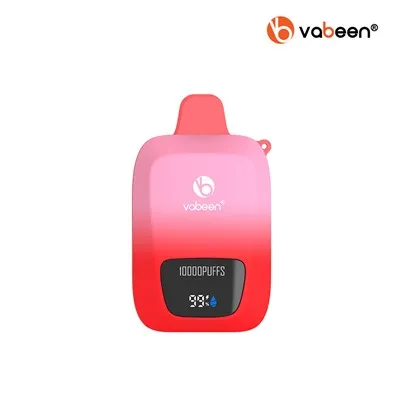
So if you’re ready to upgrade from that tiny, clunky vape you’ve been using, or you just need help getting your current large screen vape set up right, hit up our procurement team to connect and chat through your needs. We’re here to make sure you get exactly what you want, and that your vape works the way you want it to. Don’t overcomplicate it—start with the basics, adjust as you go, and enjoy those smooth, consistent hits. That’s what it’s all about.
Vape Pod System References
- Vaping Technology Association. (2023). Best Practices for Mod Device Settings and Coil Compatibility.
- Electronic Cigarette Safety Foundation. (2022). User-Friendly Features of Large Screen Vaping Mods.
- Consumer Electronics and Vaping Industry Council. (2024). Adjustment Guidelines for Touchscreen-Enabled Vaping Devices.
Shenzhen Jiandun Technology Co., Ltd.
As one of the most professional large screen vape manufacturers and suppliers in China, we have world-leading production equipment and strong manufacturing capabilities. Please rest assured to buy high quality large screen vape for sale here from our factory. Contact us for quotation and free sample.
Address: 5th Floor, No.2 Building, GaoXinqi Science and Technology Park Phase II, No.6, Longchang Road, Xin’an Street, Bao’an District, Shenzhen, Guangdong, China
E-mail: info@vabeen.com
WebSite: https://www.vabeenvape.com/
